Hi, how we can help?
How to Request Refund
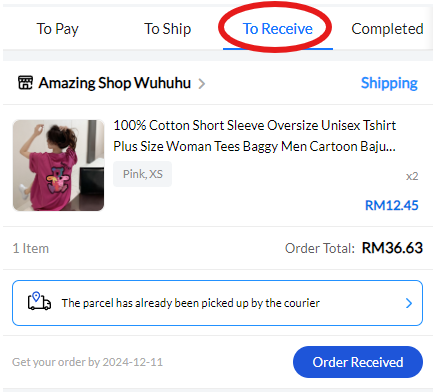
Refunds can only be requested when an order is in the “To Receive” status. VMall provides a 5-day period for checking the product condition. It is important to inspect the item during this time, as after 5 days, the system will automatically change the status to “Order Received”, and refunds can no longer be requested for that item. VMall recommends discussing any issues with the seller before submitting a refund request to facilitate faster resolution.
To request a refund, follow these steps:
Step 1: Go to the Order Status “Order Received” (For access instructions, refer to How To Track Order Status), then press the order containing the product you wish to request a refund for.
Note That:
– Refunds must be requested per item, not as a bundle for the entire order
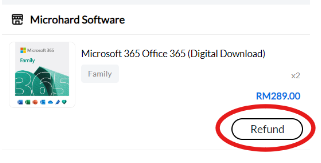
Step 2: After accessing the order detail page for the order that contains the product you wish to refund, press the “Refund” button next to each product you want to request a refund for.
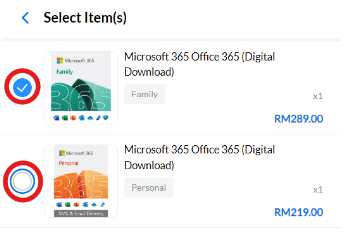
Step 3: After entering the “Request Refund” page, buyers can add more products for refund by pressing “+ Select Item(s)”, but they must be from the same order. Select additional products by clicking the circle icon beside each product and press confirm on the bottom.

Step 4: You will now be required to select the “Reason” for the refund from the dropdown menu.
Note That:
– Each product must have its own selected reason for the refund.
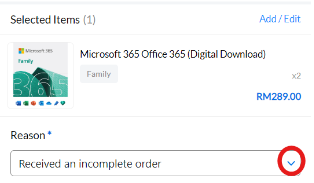
Step 5: After selecting the reason for the refund, check the total refund amount preview displayed.
Note That:
– Refunds will be processed by the seller first, who will decide the refund amount.
– Sellers can reject the refund request, which will then be reviewed by VMall Admin.
– If the seller does not take any action (approve or reject) within 2 days, VMall Admin will respond to the request.
– If both the seller and VMall Admin confirm the rejection of the refund request, the order status will automatically change to “Completed.”
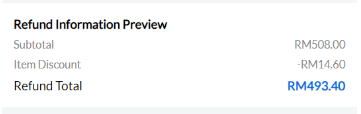
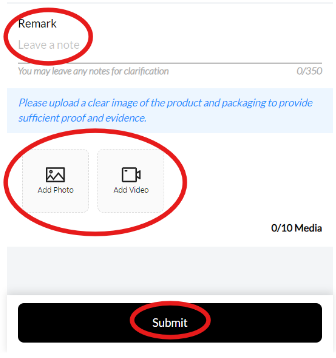
Step 6: After reviewing the refund amount, buyers can leave a remark note (up to 350 words) or optionally attach a video or image. Once you have completed this, press the “Submit” button to submit the refund request.