Hi, how we can help?
Definition of Discount Detail
Discount details are only displayed when preparing to check out in the shopping cart. They will only appear upon selecting product items and using a subtotal voucher. To check it, follow the steps below:
Note That: Discount details will only display when using a voucher (for instructions, refer to “How to Use Voucher“).
Step 1: Scroll to the bottom of the shopping cart, where you will see a “Saved” option below the total price amount.
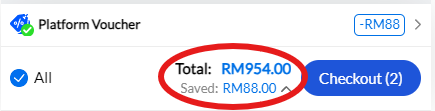
Pressing it will display the full “Discount Detail”
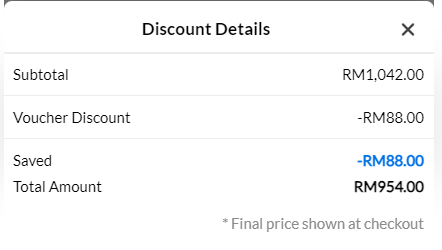
What’s that?
Subtotal: This is the total price amount for the product items.
Voucher Discount & Saved: This shows the total discount amount provided by the voucher.
Total Amount: This displays the total amount after discounts, indicating the final amount to pay